We have a few scheduled tasks running on a Windows server and monitored by a self-hosted Sentry instance.
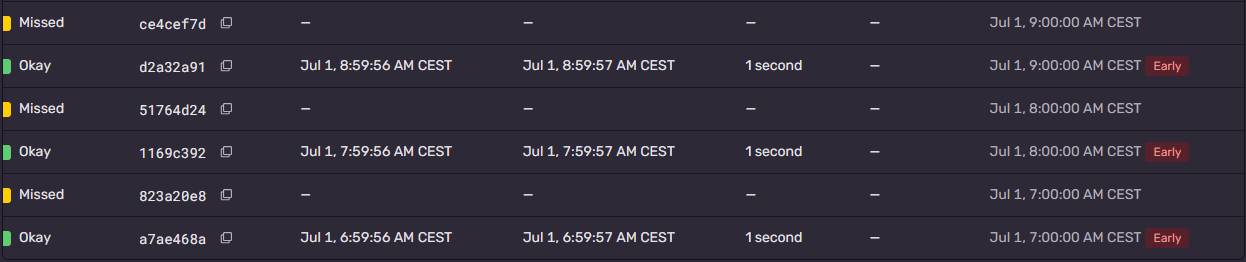
Sentry was reporting to us about missed check-ins. Looking at the monitor details, we've noticed the scheduled task was being dispatched early. So the expected dispatch at the start of every minute (0 * * * *) was never fulfilled.
Visiting the website time.is from the Windows server we’ve identified that our clock was 5 seconds ahead.
This explains why our scheduled tasks were dispatched early, but we had to know why our clock wasn't synchronized.
Using PowerShell, first we check the status of the Windows time service:
w32tm /query /status
Indicador de salto: 0(ninguna advertencia)
Capa: 4 (referencia secundaria - sincronizada mediante (S)NTP)
Precisión: -23 (119.209ns por tick)
Demora de raíz: 5.0620658s
Dispersión de raíz: 5.1932719s
Id. de referencia: 0xC0A801FC (IP de origen:  192.168.1.252)
Última sincronización de hora correcta: 01/07/2026 13:02:11
Origen: DC1.sertxu.local
Intervalo de sondeo: 12 (4096s)
As we can see, our server depends on DC1.sertxu.local for the clock synchronization.
Currently, our scheduler server is synchronizing with DC1, which also seems to have a time drift.
Let's check the time service on DC1:
w32tm /query /status
Indicador de salto: 0(ninguna advertencia)
Capa: 4 (referencia secundaria - sincronizada mediante (S)NTP)
Precisión: -23 (119.209ns por tick)
Demora de raíz: 5.0620658s
Dispersión de raíz: 5.1163169s
Id. de referencia: 0xC0A801FC (IP de origen:  192.168.1.252)
Última sincronización de hora correcta: 01/07/2026 13:28:43
Origen: DC1.sertxu.local
Intervalo de sondeo: 10 (1024s)
That's kind of strange! Our DC1 server depends on itself for clock synchronization, and also has a 5-second drift. That doesn't seem right.
By default, when a Windows device joins a domain, it starts synchronizing its time with the domain servers.
But we have to make sure the primary domain server (PDC Emulator) synchronizes its time with a reliable external NTP server.
First, we have to make sure our DC1 is the primary domain server:
netdom query fsmo
Maestro de esquema          DC1.sertxu.local
Maestro nomencl. dominios   DC1.sertxu.local
PDC                         DC1.sertxu.local
Administrador de grupos RID DC1.sertxu.local
Maestro de infraestructura  DC1.sertxu.local
El comando se completó correctamente.
To start synchronizing with an external NTP server, we have to update the Windows time service configuration:
w32tm /config /manualpeerlist:"pool.ntp.org" /syncfromflags:manual /reliable:yes /update
And then restart the service:
net stop w32time
net start w32time
Now our DC1 will synchronize its time with the NTP server pool and will eventually solve its time drift.
But what will happen with the other servers and computers joined to the domain? Because our DC1 is our primary domain server, the other devices that depend on DC1 will also start to solve the time drift, so after a few minutes all devices will be in sync with the NTP server pool.